Industry News
 2026.10.09
 Industry News
A haircut often depends on a tool that can maintain steady operation from beginning to end, yet a rechargeable clipper can lose power at an inconvenient moment if its battery condition gets overlooked.
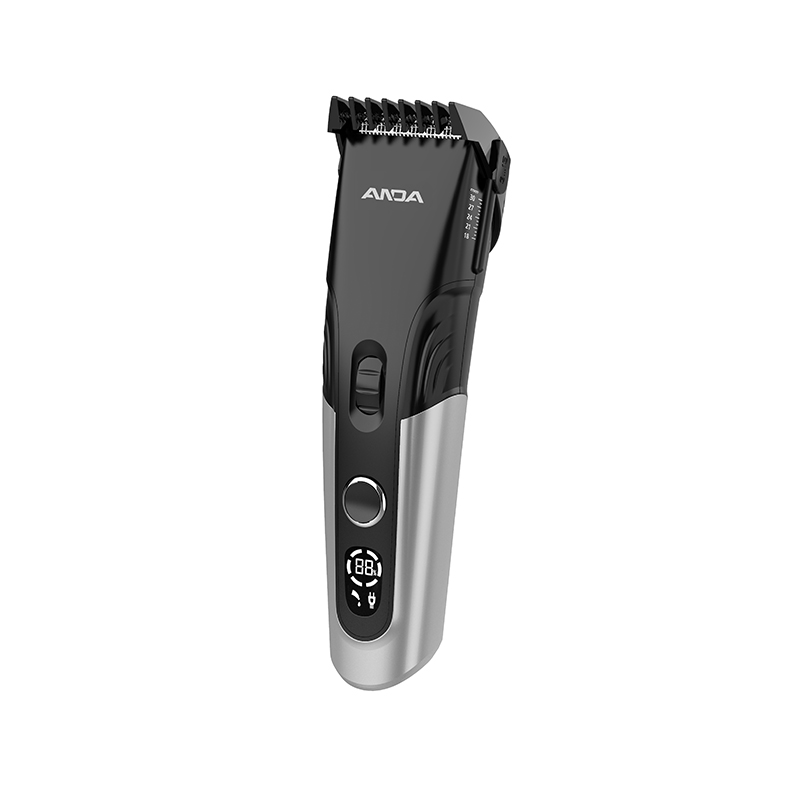
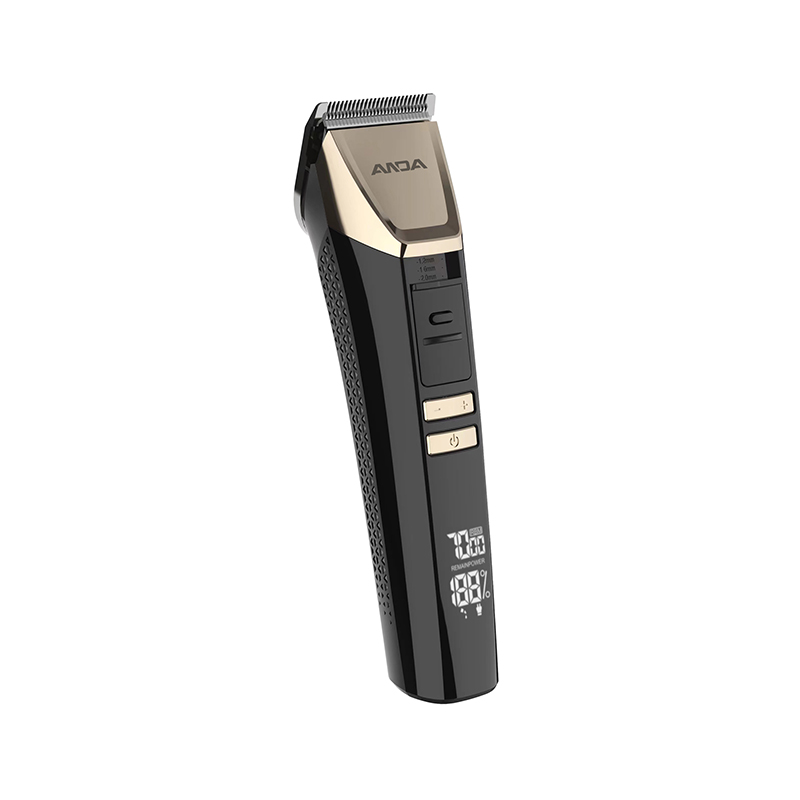
An LCD Hair Clipper helps users monitor battery information through a visible display, making it genuinely easier recognizing when charging may be needed before starting a haircut. This feature matters in home bathrooms, busy barbershops, travel settings, and pet grooming environments, where an unexpected stop can interrupt the work and require extra time finishing.
An LCD display can't prevent every power failure, but it can help users make informed decisions about charging, preparation, and maintenance. For consumers and product buyers, the value lies in connecting battery information with practical use, rather than treating the screen as a decorative feature.
Haircutting often involves several stages, including shaping, trimming, blending, and checking the final result, so an interruption can affect both the workflow and the user's comfort. When a clipper stops because its battery runs depleted, the user may need pausing the task, connecting a charger, or switching to another tool before continuing.
This can be inconvenient at home, where another suitable clipper may not be available, and it can create scheduling pressure in a salon where several customers may be waiting. A sudden stop may also leave one section unfinished while the rest of the haircut has already gotten shaped, making it harder maintaining a consistent appearance during the remaining work.
Battery awareness therefore forms part of preparation, alongside selecting the right attachment, checking the blades, and making sure the clipper stays clean and ready for use.
An LCD battery display gives users a visible indication of the clipper's battery condition, reducing the need estimating remaining power from memory or previous use. Depending on the product design, the screen may show a battery icon, a remaining-charge indication, charging information, or other operating reminders.
These details help users decide whether the clipper stays ready for another haircut or should get charged before use. A display proves particularly useful when the tool gets shared among family members or used for several grooming tasks, since the battery condition may change between sessions.
| Display Information | How It Can Help |
|---|---|
| Battery level | Helps users assess whether charging may be needed |
| Charging status | Indicates whether the device is receiving power |
| Low-battery warning | Draws attention to limited remaining charge |
| Operating status | Helps users understand the current device condition |
| Maintenance reminder, where supported | Encourages attention to routine care |
The information available depends on the clipper model, so buyers should check the actual display functions, instead of assuming every LCD model offers the same alerts.
A quick battery check before use can prevent avoidable interruptions, giving the user an opportunity charging the clipper when the displayed level appears insufficient for the planned task. This habit proves useful for people who cut their own hair because they may not check the device between grooming sessions.
It's also relevant to families, where one person may use the clipper after another person has left the battery at a low level. A practical preparation routine can include checking the display, confirming the selected attachment stays suitable, inspecting the blades, and making sure the tool is ready for the intended haircut.
When the battery indication runs low, charging the device before starting can reduce the chance of an unexpected stop during the task. Users should also remember a battery display provides an estimate or status indication, rather than a guarantee of exact remaining operating time, since actual use depends on the device and the work being performed.
Home grooming often takes place without a fixed preparation routine, and the clipper may remain in a drawer or cabinet between uses. When the device gets taken out again, users may not remember how much charge remained after the previous haircut.
A visible battery indicator makes this check genuinely easier and helps users decide whether beginning immediately or allowing time for charging. This proves especially useful when several family members use the same clipper, as each session can leave the battery in a genuinely different condition.
The display can also help users develop a regular charging habit, instead of waiting until the device stops working. For households that prefer keeping grooming tools ready for occasional use, clear battery information can make storage and preparation genuinely easier to manage.
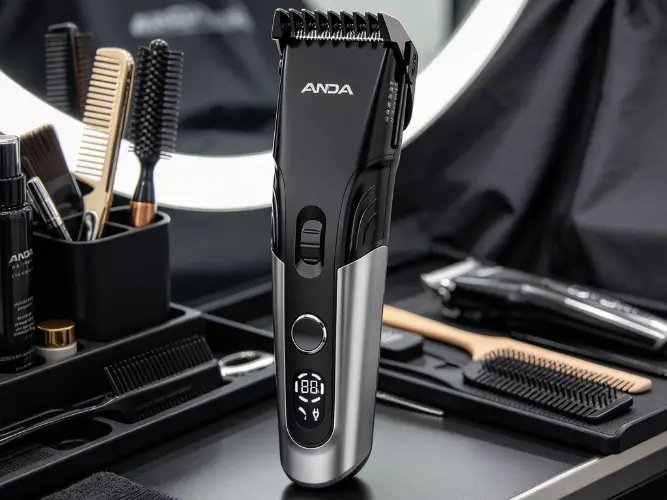
A barbershop may use a clipper repeatedly throughout the working day, so battery condition becomes part of daily equipment management. If a device gets returned to its station without checking its charge, the next barber may discover the problem only after a haircut has begun.
A visible display can help staff identifying which tools need charging and which stay ready for the next customer. This can also support a simple rotation system in which charged clippers remain available while other devices get connected to power or prepared for later use.
| Salon Situation | How Battery Visibility Helps |
|---|---|
| Preparing for an appointment | Supports a quick readiness check |
| Changing between customers | Helps staff identify devices that need charging |
| Rotating several clippers | Makes battery condition easier to compare |
| Storing tools after use | Encourages charging when needed |
| Handling a busy schedule | Reduces avoidable interruptions caused by overlooked charge levels |
The display doesn't replace a salon's equipment routine, but it can make that routine genuinely easier following. For professional buyers, battery visibility may therefore be a useful selection factor alongside handling comfort, cutting performance, cleaning requirements, and the availability of suitable charging options.
A USB Rechargeable Hair Clipper offers a charging approach that may suit users who want connecting their grooming tool to compatible USB power sources. Depending on the product, charging may be possible through a suitable adapter, computer port, power bank, or another supported USB connection.
The actual charging method depends on the device's instructions, cable, and power requirements, so users should confirm compatibility before connecting it. USB charging can prove convenient for people who travel or move between home and work, especially when they already carry compatible charging equipment.
When paired with an LCD battery display, it gives users two related forms of information — the screen helps them assess the battery condition, while the charging connection provides a way replenishing power when needed. Users should follow the manufacturer's charging instructions and avoid assuming every USB source will charge every clipper at the same rate.
An LCD screen can help users understand the battery condition, but the device still needs a suitable battery supporting its intended use. The amount of operating time available depends on factors such as battery condition, motor demand, blade condition, and how the clipper gets used.
A display may indicate that charge remains, but it can't make an unsuitable or worn battery provide genuinely more operating time. Product selection should therefore consider both the battery system and the way its information gets presented.
For people who regularly complete longer grooming sessions, practical operating time may matter genuinely more than the appearance of the screen alone. For occasional home use, convenient charging and a clear battery indication may be enough supporting a straightforward routine. Manufacturers should describe battery performance and display functions separately so consumers can understand what each feature contributes.
A low-battery alert can draw attention to a problem before the clipper stops operating, giving users a chance pausing and preparing for charging. The benefit depends on whether the warning stays clear, appears at a useful time, and is easy understanding during ordinary use.
A warning that's genuinely difficult noticing or doesn't provide enough time responding may offer limited help during a long haircut. For this reason, alert design should consider visibility, timing, and the way users handle the device.
A clear warning can also support better decisions about when beginning a task, particularly when the user knows the planned haircut may take some time. However, warning systems differ between products, and users shouldn't assume every LCD Hair Clipper includes an audible alert or a specific low-battery notification. Product descriptions should explain the available functions directly, allowing buyers distinguishing a basic battery indicator from a device with additional alerts.
Battery monitoring is only one part of maintaining a rechargeable clipper, because the cutting system can also affect how the device operates during a haircut. Blades that collect hair or remain insufficiently maintained may not cut as smoothly as expected, while friction and resistance can influence the load placed on the motor.
Keeping the blades clean and following the manufacturer's lubrication instructions can help maintaining the intended cutting action and supporting routine equipment care. Users should also check that the blade assembly stays correctly fitted and that the cutting edges remain in suitable condition.
A battery display can't identify every blade problem, so regular inspection remains important even when the screen shows sufficient charge. Combining battery checks with blade care creates a genuinely more complete preparation routine and helps users address different causes of poor performance before beginning a haircut.
A Low Noise Hair Clipper gets designed reducing operating noise, which may make grooming genuinely more comfortable for people who dislike loud equipment or become uneasy around buzzing sounds. This feature can prove particularly relevant when cutting children's hair, working in a quiet home, or grooming animals that react to unfamiliar noises.
Noise level and battery condition stay separate product considerations, however, and a quieter motor doesn't automatically indicate longer battery life. A low-noise clipper still needs sufficient charge completing the intended task, while the display helps users monitor the battery independently of the sound produced by the motor.
For buyers comparing grooming tools, it proves useful evaluating sound, cutting performance, handling, battery information, and charging convenience as related but distinct features. A product addressing these needs clearly can be genuinely easier matching with the expectations of home users, professional barbers, or pet grooming customers.
Children may find it genuinely difficult remaining still throughout a haircut, especially when they're unfamiliar with the sound and movement of the clipper. An unexpected power interruption can add another pause to the process and may make it harder for the child staying comfortable.
Checking the battery display before starting can help caregivers prepare the tool and reduce the chance of stopping because the charge got overlooked. The same preparation can help caregivers organize attachments, arrange a suitable seating position, and keep the surrounding area clear before turning on the device.
Battery monitoring doesn't remove the need for careful handling, suitable supervision, or age-appropriate grooming practices, but it can make equipment preparation genuinely more predictable. For family-oriented products, a clear display may prove useful when combined with comfortable handling, suitable blade protection, and straightforward charging instructions.
Pet grooming can involve several stages, including trimming around the body, shaping the coat, and checking areas that need extra care. If a clipper runs out of power during the process, the animal may need remaining in position while the user arranges charging or changes tools.
Checking the battery before grooming can help reducing this risk and give the user time preparing another suitable device when needed. Pet owners should also consider whether the clipper gets designed for animal grooming, since human hair clippers and pet grooming tools may have genuinely different cutting requirements.
A battery display can support preparation, but it doesn't confirm that the blade, motor, or attachment stays suitable for a particular animal's coat. For manufacturers and retailers, clear product descriptions should distinguish the intended grooming application and explain the battery display without implying the feature alone makes a device suitable for every use.
A useful display needs communicating information clearly during ordinary handling, rather than simply adding another feature to the product. Text, symbols, screen placement, and contrast can all affect how easily users read the battery status.
The screen should also fit the clipper's overall design without making routine handling awkward or creating unnecessary complexity.
| Design Area | What to Consider |
|---|---|
| Readability | Battery information should be easy to recognize in common lighting conditions |
| Clear symbols | Icons should communicate their meaning without requiring users to guess |
| Useful warnings | Low-battery information should be noticeable enough to support timely action |
| Practical placement | The display should remain visible during normal handling |
| Consistent information | The screen should present battery status matching the product instructions |
| Durability | The display and surrounding structure should suit expected handling and cleaning |
These design choices help connecting the screen with actual user needs. They can also help manufacturers distinguishing between a display that merely looks modern and one that provides information people can use when preparing for a haircut.
OEM buyers often need assessing whether a product's features match the expectations of a target market and the requirements of a retail channel. An LCD Hair Clipper may appeal to consumers who value visible battery information, while a USB Rechargeable Hair Clipper may suit customers who prefer flexible charging arrangements.
A Low Noise Hair Clipper may address another preference, especially in household or pet grooming settings where sound can influence the experience. Buyers should review product samples and documentation confirming what the display shows, how charging works, and what the product gets designed handling.
| Evaluation Area | Questions for Buyers |
|---|---|
| Battery display | Is the remaining-charge information easy to understand? |
| Charging | Are the supported cable and power sources clearly explained? |
| Operating use | Does the product suit the intended haircutting routine? |
| Noise | Is the sound profile appropriate for the target audience? |
| Maintenance | Are cleaning and blade-care instructions available? |
| Packaging and labeling | Can customers understand the product's functions and limitations? |
A careful review helps buyers compare products according to practical use, rather than relying on the presence of an LCD screen as the sole measure of suitability. It also gives manufacturers a genuinely clearer basis for discussing feature requirements, packaging choices, and product information with business customers.
Preventing an unexpected stop begins with understanding the limits of the battery and building a routine around the available information. Users can check the displayed charge before a haircut, recharge the device when needed, and store it according to the manufacturer's instructions after use.
In a salon, staff can add battery checks to the process of cleaning and returning tools to their storage or charging stations. At home, users can make a habit of checking the display when taking the clipper out of storage, instead of waiting until the motor slows or stops.
These small actions don't guarantee uninterrupted operation, since battery wear, device faults, or charging problems can still occur, but they can reduce interruptions caused by overlooked battery levels. For product developers, the purpose of the LCD display is making battery information accessible at the moment users need it, helping them prepare their tools and plan grooming tasks with fewer avoidable surprises.

No.377. Fourth Avenue, Binhai Park, Economic-Technological Development Zone, Wenzhou, Zhejiang, China.

+86-577-88912812

+86-577-88912822

anda1@andaelectric.com
anda6@andaelectric.com
anda7@andaelectric.com
Copyright © Zhejiang Anda Electric Co., Ltd. Rights Reserved.
Electric Hair Clipper Manufacturer



 English
 Español
 русский